Showing posts with label Blogger widgets. Show all posts

Saturday, 20 April 2013

Blogger have Released New HTML/Template Editor

Google Blogger is a well-known blogging service that offers many features to its users. For example, Blogger comes with a Template Designer user interface that lets you tweak your blog’s appearance as much as you want. (However, the templates provided are, in my opinion, no match compared to WordPress themes.)

When it comes to ease of use, most beginners prefer Blogger as it offers a no-nonsense interface for administering your blog and top-notch integration with their Google account. Another great thing about Blogger is that it offers certain great features for free that you normally need to pay for in other blog-publishing services,  most noteworthy being the ability to set up custom domains without paying a cent.

Benefits Of Changing

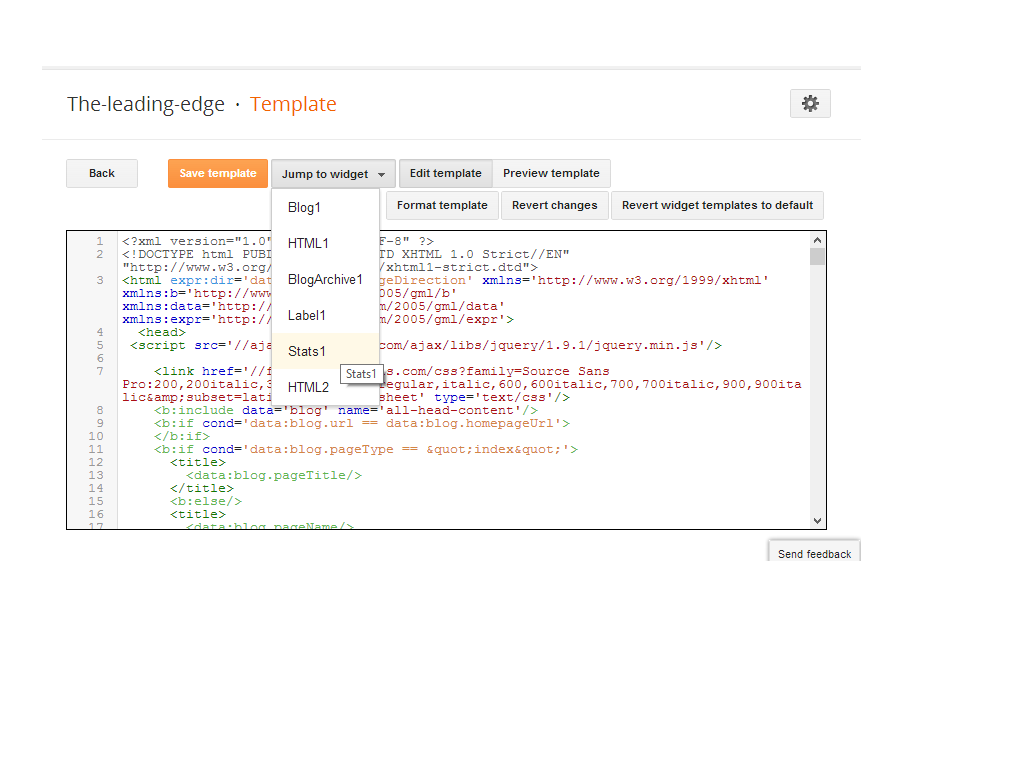
The free blogging platform for everyone, rolled out its new HTML Template editor today. It was difficult on editing  of template before.Many of blogger were wishing to get the changes on it, Finally blogger has made some extra changes on it. The changes made it easy to edit templates now. The improved HTML template editor now supports line numbering, syntax highlighting, auto-indentation and code folding to make editing your template much easier. Let's see what are the changes made by blogger: 

Jump To Widget

This is a nice change made by blogger, you can now jump to the widget which you want to edit.
Format Template

Blogger added a new Format template button that automatically cleans up the indentation of the template


Preview Template
Before if you click on Preview Template template was previewing in another tab, but now you will see preview in same page.
And Other
Given above are major changes, blogger has changed some other functions also. Line numbering, syntax highlighting, auto-indentation and code folding are the best changes for me. A clean interface, Fast loading, and made it possible to search for text by pressing Ctrl+F once you have clicked into the editor. To find and replace text occurrences one by one, use Ctrl+Shift+F or to find and replace all occurrences at once, use Ctrl+Shift+R.

New Thing..

Some of my friend report that Where are CSS codes, Now here is the solution :
Go to Template Editor, Press ctrl+f, type <b:skin> and Press Enter, There you can see some code like this, click on side of <b:skin> to expand CSS codes. Look at the image below:

ARe these changes are good ? in my opinion these are great changes put it by blogger.com. Please put your views using comment box below. Peace, Happy Blogging.


Posted By Unknown 22:48

Friday, 19 April 2013

How To Add POP UP Facebook Like Box For Blog & Website?


About Widget

This widget pops up a jQuery window containing Facebook likebox as soon as a new visitor arrives. This plugin can be added to both Blogger Blogs and Wordpress. I am using here the same jQuery effect like this one can be widely seen on many blogs now. It will help you increase your Facebook Fans greatly.
This popup appears only once to every new visitor. The ip address of the visitor is stored in browser cookie and as the page loads again the widget wont be called again for the same visitor thus eliminating the chances of bugging regular readers. Because of course it will look weird if the popup appears again and again on every pageview.
It will appear both on homepage and sub pages depending which page the visitor is accessing. I have set the cookie refresh time to 30 days, which means that this lightbox will appear again for the same visitor after 30 days. We can easily set the number of days to prompt the visitors about your Facebook Fan page. Lets get straight to the one step installation process.
Get the more fans to your fanpage blogger by adding a popup facebook like box to your blogspot.By adding this customized widget may know the visitors to know the number of people like your website and join your site directly.To get this widget follow below procedure:-


Features:

  • Un-Blockable POP-UP By All Browsers.
  • POP-UP With LightBox Effect.
  •  Close Button Also Included.
  • Quick To Load And Easy To Install.
  •  Simple And Stylish Design.


How To Add In Blogspot?

  1.  Go To Your www.blogger.com
  2.  Open Your Desire Blog.
  3.  Go To Layout.
  4.  Click "Add A Gadget" Where You Want To Add It.
  5.  Now Scroll To "HTML-JAVASCRIPT"
  6.  Click "+" Icon To Add It.
  7.  Now Copy The Below Code And Paste It To There.
  8.  Leave The Title Empty.
  9.  Click Save, Now You Are Done.


How To Add In Website?

  1.  Just Go To Your HTML File.
  2.  Now Copy The Below Code And Paste It Between <body> </body>.
  3. Save It, Now You Are Done. 


<script src='https://ajax.googleapis.com/ajax/libs/jquery/1.8.1/jquery.min.js'></script>
<script src="http://exeideasinternational.googlecode.com/files/jquery.colorbox-min.js"></script>
<script type="text/javascript">
jQuery(document).ready(function(){
if (document.cookie.indexOf('visited=true') == -1)
{
var fifteenDays = 1000*60*60*24*10;
var expires = new Date((new Date()).valueOf() + fifteenDays);
document.cookie = "visited=true;expires=" + expires.toUTCString();
$.colorbox({width:"400px", inline:true, href:"#LEading-edgestylepopups"});
}
});
</script>
<style type="text/css">
/*
ColorBox v1.3.16
(Copyright (c) 2011 Jack Moore - jack@colorpowered.com)
*/
#colorbox,#cboxOverlay,#cboxWrapper{position:absolute;top:0;left:0;z-index:9999;overflow:hidden}#cboxOverlay{position:fixed;width:100%;height:100%}#cboxMiddleLeft,#cboxBottomLeft{clear:left}#cboxContent{position:relative}#cboxLoadedContent{overflow:auto}#cboxTitle{margin:0}#cboxLoadingOverlay,#cboxLoadingGraphic{position:absolute;top:0;left:0;width:100%}#cboxPrevious,#cboxNext,#cboxClose,#cboxSlideshow{cursor:pointer}.cboxPhoto{float:left;margin:auto;border:0;display:block}.cboxIframe{width:100%;height:100%;display:block;border:0}#cboxOverlay{background:#000;opacity:0.5 !important}#colorbox{box-shadow:0 0 15px rgba(0,0,0,0.4);-moz-box-shadow:0 0 15px rgba(0,0,0,0.4);-webkit-box-shadow:0 0 15px rgba(0,0,0,0.4)}#cboxTopLeft{width:14px;height:14px;background:url(https://blogger.googleusercontent.com/img/b/R29vZ2xl/AVvXsEjClHFF47JyPZ1w39NfIOy6fZWO-8jy5fqcaFisNHBgDzG7-lBKIGGP5EVEmB-wIcGMRjv9TtgLdercntOIAqUVKy3Mn1_ORfBpZ3O2yc55b8B0Dn7ccAJKlb9aCF-onWt_t5xvLY0GKVQ/s1600/controls.png) no-repeat 0 0}#cboxTopCenter{height:14px;background:url(https://blogger.googleusercontent.com/img/b/R29vZ2xl/AVvXsEidpw43ne5wRs9h-FmnLPcNd8ObFJcE1BVCDmKmnUyTJ6UAw-AhjZaP77XLWhHfdkzv4fdVj8pPi-cOC5FIVDQPqMNoYb6Ffw131OFpJH-0Yv63dtos5XcHVyLom6OW54nQLFzwPPtkoVw/s400/border.png) repeat-x top left}#cboxTopRight{width:14px;height:14px;background:url(https://blogger.googleusercontent.com/img/b/R29vZ2xl/AVvXsEjClHFF47JyPZ1w39NfIOy6fZWO-8jy5fqcaFisNHBgDzG7-lBKIGGP5EVEmB-wIcGMRjv9TtgLdercntOIAqUVKy3Mn1_ORfBpZ3O2yc55b8B0Dn7ccAJKlb9aCF-onWt_t5xvLY0GKVQ/s1600/controls.png) no-repeat -36px 0}#cboxBottomLeft{width:14px;height:43px;background:url(https://blogger.googleusercontent.com/img/b/R29vZ2xl/AVvXsEjClHFF47JyPZ1w39NfIOy6fZWO-8jy5fqcaFisNHBgDzG7-lBKIGGP5EVEmB-wIcGMRjv9TtgLdercntOIAqUVKy3Mn1_ORfBpZ3O2yc55b8B0Dn7ccAJKlb9aCF-onWt_t5xvLY0GKVQ/s1600/controls.png) no-repeat 0 -32px}#cboxBottomCenter{height:43px;background:url(https://blogger.googleusercontent.com/img/b/R29vZ2xl/AVvXsEidpw43ne5wRs9h-FmnLPcNd8ObFJcE1BVCDmKmnUyTJ6UAw-AhjZaP77XLWhHfdkzv4fdVj8pPi-cOC5FIVDQPqMNoYb6Ffw131OFpJH-0Yv63dtos5XcHVyLom6OW54nQLFzwPPtkoVw/s400/border.png) repeat-x bottom left}#cboxBottomRight{width:14px;height:43px;background:url(https://blogger.googleusercontent.com/img/b/R29vZ2xl/AVvXsEjClHFF47JyPZ1w39NfIOy6fZWO-8jy5fqcaFisNHBgDzG7-lBKIGGP5EVEmB-wIcGMRjv9TtgLdercntOIAqUVKy3Mn1_ORfBpZ3O2yc55b8B0Dn7ccAJKlb9aCF-onWt_t5xvLY0GKVQ/s1600/controls.png) no-repeat -36px -32px}#cboxMiddleLeft{width:14px;background:url(https://blogger.googleusercontent.com/img/b/R29vZ2xl/AVvXsEjClHFF47JyPZ1w39NfIOy6fZWO-8jy5fqcaFisNHBgDzG7-lBKIGGP5EVEmB-wIcGMRjv9TtgLdercntOIAqUVKy3Mn1_ORfBpZ3O2yc55b8B0Dn7ccAJKlb9aCF-onWt_t5xvLY0GKVQ/s1600/controls.png) repeat-y -175px 0}#cboxMiddleRight{width:14px;background:url(https://blogger.googleusercontent.com/img/b/R29vZ2xl/AVvXsEjClHFF47JyPZ1w39NfIOy6fZWO-8jy5fqcaFisNHBgDzG7-lBKIGGP5EVEmB-wIcGMRjv9TtgLdercntOIAqUVKy3Mn1_ORfBpZ3O2yc55b8B0Dn7ccAJKlb9aCF-onWt_t5xvLY0GKVQ/s1600/controls.png) repeat-y -211px 0}#cboxContent{background:#fff;overflow:visible}#cboxLoadedContent{margin-bottom:5px}#cboxLoadingOverlay{background:url(https://blogger.googleusercontent.com/img/b/R29vZ2xl/AVvXsEio88f_LpVlH-JEROUlwuQYdc74m3SeBgc-hQ3otHf5DmEpLXcLtXF1EJvldXSfRVBjLCH6kM07Kzf-aSe9ZTuz_BzxC9FmheB8X5_OIHXLwtOpNpZoL_Cx4sB_qURVC9h_wli68PfSjH8/s400/loadingbackground.png) no-repeat center center}#cboxLoadingGraphic{https://blogger.googleusercontent.com/img/b/R29vZ2xl/AVvXsEh4ulxmg5BzanpP3aWnNUVv5Hj70H-FdM2NlPTCPHLQ6UyfacqtQDBm_GA4ebIKadQVg_oeJUgdhrnVVmXAmcXImEZ6JPNoFwfH45SekMsItfhzAcFjkvcKMxC4Itv_2b69cuIeDbmWnLQ/s400/loading.gif) no-repeat center center}#cboxTitle{position:absolute;bottom:-25px;left:0;text-align:center;width:100%;font-weight:bold;color:#7C7C7C}#cboxCurrent{position:absolute;bottom:-25px;left:58px;font-weight:bold;color:#7C7C7C}#cboxPrevious,#cboxNext,#cboxClose,#cboxSlideshow{position:absolute;bottom:-29px;background:url(https://blogger.googleusercontent.com/img/b/R29vZ2xl/AVvXsEjClHFF47JyPZ1w39NfIOy6fZWO-8jy5fqcaFisNHBgDzG7-lBKIGGP5EVEmB-wIcGMRjv9TtgLdercntOIAqUVKy3Mn1_ORfBpZ3O2yc55b8B0Dn7ccAJKlb9aCF-onWt_t5xvLY0GKVQ/s1600/controls.png) no-repeat 0px 0px;width:23px;height:23px;text-indent:-9999px}#cboxPrevious{left:0px;background-position:-51px -25px}#cboxPrevious.hover{background-position:-51px 0px}#cboxNext{left:27px;background-position:-75px -25px}#cboxNext.hover{background-position:-75px 0px}#cboxClose{right:0;background-position:-100px -25px}#cboxClose.hover{background-position:-100px 0px}.cboxSlideshow_on #cboxSlideshow{background-position:-125px 0px;right:27px}.cboxSlideshow_on #cboxSlideshow.hover{background-position:-150px 0px}.cboxSlideshow_off #cboxSlideshow{background-position:-150px -25px;right:27px}.cboxSlideshow_off #cboxSlideshow.hover{background-position:-125px 0px}#mdfb{font:12px/1.2 Arial,Helvetica,san-serif;color:#666}#mdfb a,#mdfb a:hover,#mdfb a:visited{text-decoration:none}.mdbox-title{background:#000;color:#fff;font-size:20px !important;font-weight:bold;margin:10px 0;border:20px solid #ddd;-moz-border-radius:6px;-webkit-border-radius:6px;border-radius:6px;box-shadow:5px 5px 5px #CCC;padding:10px;line-height:25px;font-family:arial !important}
</style>
<div style='display:none'>
<div id='leading-edgestylepopups' style='padding:10px; background:#fff;'>
<center><h3 class="mdbox-title">Receive all updates via Facebook. Just Click the Like Button Below...</h3></center><center>
<iframe src="//www.facebook.com/plugins/likebox.php?href=http%3A%2F%2Fwww.facebook.com%2FLifeOky&amp;width=300&amp;colorscheme=light&amp;show_faces=true&amp;border_color=%23ffffff&amp;stream=false&amp;header=false&amp;height=258" scrolling="no" frameborder="0" style="border:none; overflow:hidden; width:300px; height:258px;" allowtransparency="true"></iframe>
</center><p style=" float:right; margin-right:35px; font-size:9px;" >Powered By <a style=" font-size:9px; color:#3B78CD; text-decoration:none;" href="http://the-leading-edge.blogspot.com/">The-Leading-Edge</a></p>
</div></div>


Customization:

  •  Replace LifeOky With Your Facebook Username.
  •  It Will Not POP Up Again And Again On Every Reload Or Every Pages. To Review The Widget Just Delete Your Browser Cookies And Refresh The Page To See It Appearing Again.
  •  If You Want To Appear This Widget On Every Reload Of Your Visitor On Every Page, Just Change true To false
  •  This Widget Will Again POPUP On Your Viewer Desktop After 10 Day If He Is Clearing His Browser Cookies, If You Want To Minimize This Time, Just Change *10 From The Above Code To Your Desire Day With 10.
  •  You Can Also Change The Text In Black Bold Text.
  •  Save And Done..

Posted By Unknown 03:27