Showing posts with label Changes in blogspot. Show all posts

Monday, 22 April 2013

Now Add Google Comments under Blog post


Add Google comments Under Blog post

Google Has Introduced

As we have already posted some of the new features that were introduce by the Google on its products, and Google keep on updating its products regularly.
As lastly Google have made a major change to is blogger products. Google have changed the whole designed of the Blogger template editor, and introduce awesome new things.
Againg Google have introduce a awesome new features for the blogger.

Now Google has introduced  Google plus commnets box for the blogger.
This features looks awesome and clean. This will not effects to your blog SEO also. Apart from this you can also track the comments on your Google plus post.
This is a second new improvement by Google in Blogger this week,
Previous one was just a few days ago:
Google Blogger introduces improved Template HTML editor.
Unlike Traditional Blogger commenting system, the Google Plus commenting system will help you to get some decent amount of traffic from Google Plus social network that is whenever someone will comment on your post, the comments would be synchronized to Google plus Post, as well as you will get more comments on your blogger post.

Why you should Add Google plus Comments to your Blog?

Once you integrate this new commenting system, you’ll get the following benefits.
  • New Design, Looking awesome.
  • Fast and User friendly commenting environment.
  • An easy way to let user share your post on Google Plus.
  • Synchronization of your blog post and Google plus Post.
  • You’ll get more comments on your blogger post.
  • Linked to Google Plus post, thus more +1’s.
  • An easy way to let user recommend your post to Google.
  • Much more exposure, because the user who comment on your blog post is actually commenting and sharing your post on Google Plus.
  • You will get rid of spam comments on your blog.
  • No need to moderate comments, thus it will save your time.

What are the Disadvantages of Google plus Commenting System?

  • No Option for Anonymous User.
  • User must have Gmail id.
  • User must have created Google plus Account.( I don't Think so that these are disadvantages because these restrictions safe our blog from spammers )

how to Integrate Google Plus comments with blogger

    It is very easy to integrate Google plus comments box with to your blogger. This can be done very simple steps. For this
    •  Login to your blogger dashboard.
    •  Click on the Google+ tab at the right bar of  your dashboard.
    •  Just check the "Use Google+ Comments on this blog".
    • That it you have done..
    • Now see the change on the comment box of your blog post.

    I personally think that this new commenting system will increase comments on your blog and visitors.
    The main reason that I like this new commenting system is that it won’t get robots to comment on my blog. Leave me a comment and share your views.

    Posted By Unknown 08:58

    Saturday, 20 April 2013

    Blogger have Released New HTML/Template Editor

    Google Blogger is a well-known blogging service that offers many features to its users. For example, Blogger comes with a Template Designer user interface that lets you tweak your blog’s appearance as much as you want. (However, the templates provided are, in my opinion, no match compared to WordPress themes.)

    When it comes to ease of use, most beginners prefer Blogger as it offers a no-nonsense interface for administering your blog and top-notch integration with their Google account. Another great thing about Blogger is that it offers certain great features for free that you normally need to pay for in other blog-publishing services,  most noteworthy being the ability to set up custom domains without paying a cent.

    Benefits Of Changing

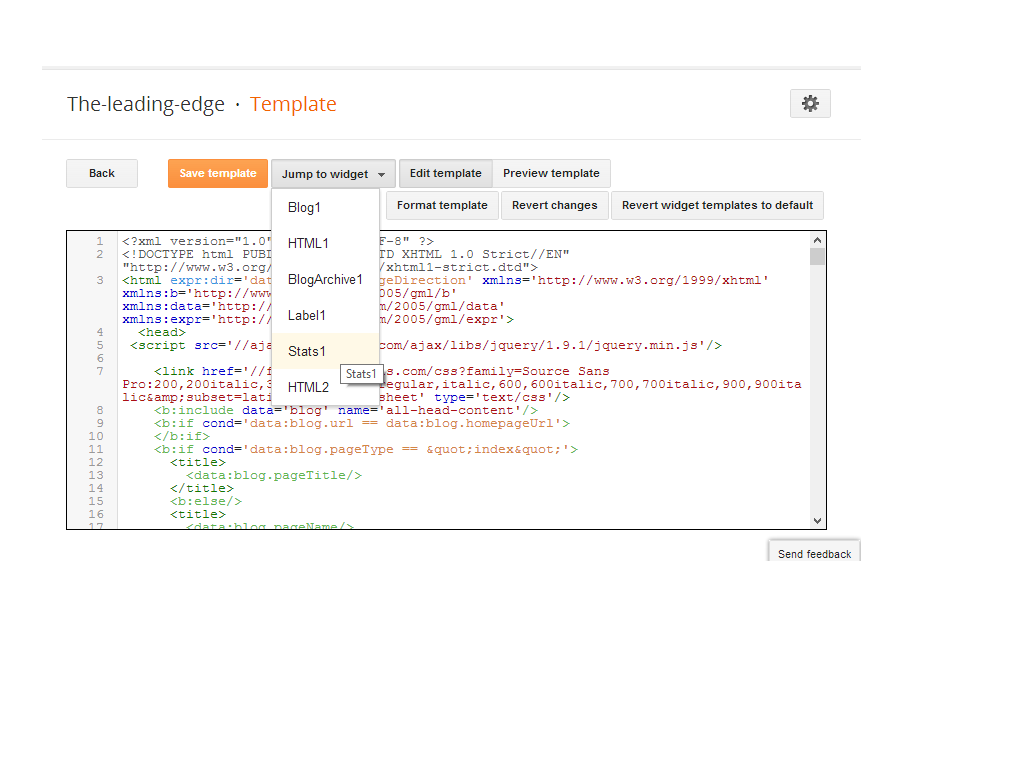
    The free blogging platform for everyone, rolled out its new HTML Template editor today. It was difficult on editing  of template before.Many of blogger were wishing to get the changes on it, Finally blogger has made some extra changes on it. The changes made it easy to edit templates now. The improved HTML template editor now supports line numbering, syntax highlighting, auto-indentation and code folding to make editing your template much easier. Let's see what are the changes made by blogger: 

    Jump To Widget

    This is a nice change made by blogger, you can now jump to the widget which you want to edit.
    Format Template

    Blogger added a new Format template button that automatically cleans up the indentation of the template


    Preview Template
    Before if you click on Preview Template template was previewing in another tab, but now you will see preview in same page.
    And Other
    Given above are major changes, blogger has changed some other functions also. Line numbering, syntax highlighting, auto-indentation and code folding are the best changes for me. A clean interface, Fast loading, and made it possible to search for text by pressing Ctrl+F once you have clicked into the editor. To find and replace text occurrences one by one, use Ctrl+Shift+F or to find and replace all occurrences at once, use Ctrl+Shift+R.

    New Thing..

    Some of my friend report that Where are CSS codes, Now here is the solution :
    Go to Template Editor, Press ctrl+f, type <b:skin> and Press Enter, There you can see some code like this, click on side of <b:skin> to expand CSS codes. Look at the image below:

    ARe these changes are good ? in my opinion these are great changes put it by blogger.com. Please put your views using comment box below. Peace, Happy Blogging.


    Posted By Unknown 22:48