Showing posts with label complete Blogger tutorials. Show all posts

Saturday, 20 April 2013

Blogger have Released New HTML/Template Editor

Google Blogger is a well-known blogging service that offers many features to its users. For example, Blogger comes with a Template Designer user interface that lets you tweak your blog’s appearance as much as you want. (However, the templates provided are, in my opinion, no match compared to WordPress themes.)

When it comes to ease of use, most beginners prefer Blogger as it offers a no-nonsense interface for administering your blog and top-notch integration with their Google account. Another great thing about Blogger is that it offers certain great features for free that you normally need to pay for in other blog-publishing services,  most noteworthy being the ability to set up custom domains without paying a cent.

Benefits Of Changing

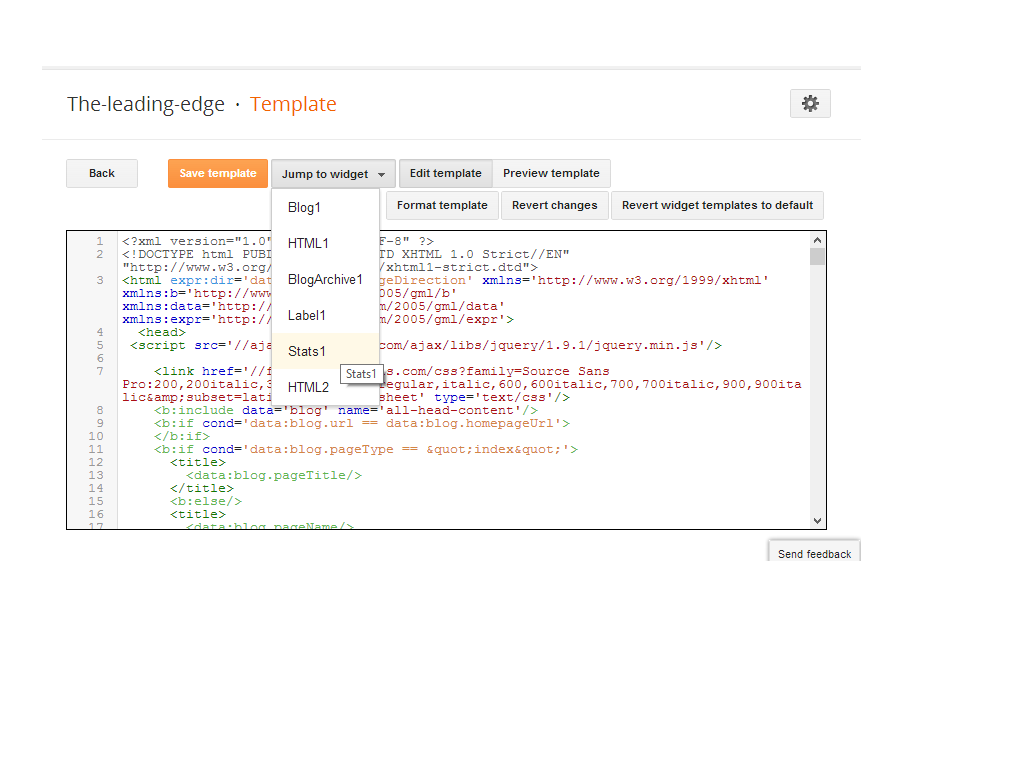
The free blogging platform for everyone, rolled out its new HTML Template editor today. It was difficult on editing  of template before.Many of blogger were wishing to get the changes on it, Finally blogger has made some extra changes on it. The changes made it easy to edit templates now. The improved HTML template editor now supports line numbering, syntax highlighting, auto-indentation and code folding to make editing your template much easier. Let's see what are the changes made by blogger: 

Jump To Widget

This is a nice change made by blogger, you can now jump to the widget which you want to edit.
Format Template

Blogger added a new Format template button that automatically cleans up the indentation of the template


Preview Template
Before if you click on Preview Template template was previewing in another tab, but now you will see preview in same page.
And Other
Given above are major changes, blogger has changed some other functions also. Line numbering, syntax highlighting, auto-indentation and code folding are the best changes for me. A clean interface, Fast loading, and made it possible to search for text by pressing Ctrl+F once you have clicked into the editor. To find and replace text occurrences one by one, use Ctrl+Shift+F or to find and replace all occurrences at once, use Ctrl+Shift+R.

New Thing..

Some of my friend report that Where are CSS codes, Now here is the solution :
Go to Template Editor, Press ctrl+f, type <b:skin> and Press Enter, There you can see some code like this, click on side of <b:skin> to expand CSS codes. Look at the image below:

ARe these changes are good ? in my opinion these are great changes put it by blogger.com. Please put your views using comment box below. Peace, Happy Blogging.


Posted By Unknown 22:48

Friday, 5 April 2013

How To Decide?Blogger or WordPress For Blogging


Introduction:  

This post will illustrate different types of features of the most popular platforms for blogging, such as Blogger and WordPress.There are also other platforms other than mentioned in this posts, that are Joomla,Tumblr, Drupal. But we will stuck with the most popular's.we will give you suggestions and advice's to decide which one to select and use, if you are confused which one to choose for blogging. this post will clear all the confusions.Before we introduce the features of the both platforms, let's differentiate the main differences.


Starting a Blog


Blogger: Creating a blog on Blogger is one of the most easiest things you can do on the Internet. You don't need any kind of technical knowledge, its more simple than creating your email address. You can create a blogspot blog within 10 seconds, this is the reason newbie bloggers prefer Blogger as their blogging platform.

WordPress: There are two ways to create a WordPress blog, by creating a free blog on WordPress.com or purchasing web hosting and installing WordPress. Through out this comparison, We will be comparing Blogger with Self-hosted WordPress blog. Starting a self-hosted WordPress blog requires a lots of technical knowledge to buy and manage a domain name, purchasing reliable web hosting, a credit card for purchasing domains and hosting, installing WordPress, managing with blog with sufficient plugins etc. This is the main reason why most of bloggers does not support WordPress however it is not that complicated, you can learn these things within few hours from Internet.

Customization, Flexibility and SEO (main concern)

Blogger: Blogger templates are also available on Internet, free and premium both. You can even make changes in your template using built-in "Blogger Template Designer". You can hire a designer who have sufficient knowledge to design a completely new Blogger template. Blogger, officially has no plugins however you can find many hacks and tricks to use your free Blogger blog like Paid Wordpress blog. Its not much difficult to implement hacks and tricks into your blogger template, however the lack of official support of flexibility decreases the possibilities to make your blog better. And
 Blogger allows you manage permalinks, robots.txt file, redirecting blog URLs, making a custom 404 error page, however Blogger lacks in providing more SEO options. However, Google indexes Blogger blogs much faster than WordPress blogs. Google understands how Blogger works so they dont need much of your SEO efforts to rank your blog in search results.

WordPress: WordPress is popular for offering large number of customization possibilities. You can choose your blog theme from thousands of free available themes. Designers and Developers can even create a WordPress template by their own. WordPress plugins allows you to perform your desired tasks on your blog. You install suitable plugins from WordPress plugins directory where you will find thousands of free plugins to choose from. WordPress allows you to stick posts and with the help of plugins, you can control where to display ads, where not to display some widgets, what to display in your blog feed etc.And wordPress is widely popular for being so SEO friendly. You get everything for better SEO in WordPress blogging platform. You get huge number of plugins to optimize each and every bit of your blog.  These plugins can automatically link post keywords to older posts, suggest yo backlinks and help you in on-page SEO.

Problems You may Face (Security Aspects)


Blogger: Google controls your contents. Their team can delete your blog contents, can even delete your complete blog. They do allow you to take backups of your blog however if ones they deleted your blog, You loose your blog address, that means your blog is ruined. Your can be treated as SPAM even you completely follow the terms and condition of Blogger. The good thing about Blogger is, you don't have to worry about DDOS attacks and hackers. ( you should Read instructions before doing any thing which may cause to loose your blog.

WordPress: WordPress gives you relatively better security. Latest updates of WordPress versions keep on securing your blog with latest security features. You are not bound to post stuff. You can post whatever you want. WordPress never deletes your post, never set any of your published article into draft. Your web host will even keep backups of your work so that you can get your back if you accidentally loose. Important, if you are not an expert, DDOS and such attacks can be a trouble for your blog.

Making money


Blogger: Blogger also allows you to make money by placing Google Ads or ads by other networks. Blogger also offers you built-in Amazon affiliate network.

WordPress: Self-hosted WordPress allows you place all kind of affiliates links and ad codes. You can make as much money as you can. However free WordPress blogs does not allow you place Google AdSense or even javascripts.

Decision Which we have Taken: 


  • Blogger is almost Free, You can Create Your Blog Free
  • WordPress is Free only if you do not want  advance features of it. .
  • Compared to WordPress, Blogger is very easy,
  • if you have't enough Money then Blogger is the good decision.
  • If you want Elegant and awesome Design (with charges). then it's worth to use WordPress.
  • WordPress gives you full Control over your Site(with cmoney). while Blogger do not.
  • WordPress provide you storage with FTP support. while Blogger does not(only 1 GB for images and videos).
Now it your Turn to choose and start 
For Complete blogging tutorials visit this post :::: Visit me

Posted By Unknown 08:43

Thursday, 21 February 2013

How to start blogging

Simple steps to follow


  • Click on new blog


Follow the instructions

  • Chose Good title for your blog
  • chose URL for you blog like the-leading-edge.blogspot.com/
  • Then chose the style for your site
  • After choosing Style and then Click on create blog
If having problem then see the images you will understand easily.......  


After Completing you will see this 


Posted By Unknown 08:31

Friday, 8 February 2013

How to Start Blogging -Leading-Egde

Waiting to start blogging !


Have you been wanting to start blogging, or possibly earn some income as a professional blogger? It can be quite difficult to get started. As with any business venture, professional blogging should not be taken lightly. There will be financial investment and a lot of hard work if you really want to become a serious blogger.

Maybe you just want to blog as a way to express yourself, rather than try to make money online. Either way, there are certain steps everyone should make when beginning to blog, whether professionally, as a hobby or both.

Now a days Most of the people leaving their jobs and start blogging. As i have seen that  Blogging is becoming a passion to do work on it .

Some Blogger do work for their obsession and some do blogging for making money online

It depends on you how you work for your blog, or how long you work on it...

How Do I Start a Blog? and why ??

I will tell you the all process step by step and easy to follow, guide that will help you setup your own blog from the start. This guide is not to motivate someone to start blogging. It is best suited for someone who already made the decision to start a blog and need some step by step direction of the whole process

Posted By Unknown 13:44

Why should i become blogger ?

Blogging is becoming more and more popular everyday. why you should join the blogger? 
Their are some reasons that why you should join blogger 
have a small look on them

To Express Your Thoughts (express your self) and Opinions

Every pesron have its own hidden potentiol in it I know that, the potentiol is also hidden in you. You can impress your visiters by your good thoughts and opinions blog provide you place to express your self

To Help People 


Many blogs are written to help people who may be going through similar situations that the blogger has experienced. You can help other people by just telling them soluiton that is in your mind or give them a source of help.

To Market or Promote Something


Blogger is the great way to promote your product ,it helps you to introduce new things to the 1000's of visiters on blog
If you become a blogger it will help you to increase knowledge it always introduce new things.
Those things are very useful to you


Posted By Unknown 13:35